
Introduction
This was the scene of my first encounter with FFTA as a kid: a tiny GBA game, just 16 MB, that somehow contained such a vast, fully realized world and such exquisitely detailed battle visuals. When Mewt opened that old book, the real-world town of St. Ivalice was quietly rewritten into the fantasy world of Ivalice. Through that long summer vacation, I felt like I was living inside it too — forming a clan, learning “Two Swords,” mixing and matching jobs and races, setting out on adventure after adventure. In those moments, I really was one of Ivalice’s own. That, to me, is the true “Final Fantasy”!
In tactical RPGs, Final Fantasy Tactics Advance (2003) set a bar for pixel art and for system depth. The 2.5D isometric view, the diamond grid, the hand-drawn 45-degree buildings, the layered heights, and the Charge Time (CT) battle system are the whole package.
More than 20 years later, out of fondness for this game, I recently got an idea: faithfully recreate FFTA’s opening battle in the browser — the iconic snowball fight in the schoolyard of St. Ivalice.
Since I was already in, I didn’t want to settle for a rigid “2D canvas with pasted sprites.” I wanted freely switchable camera angles, overlooking the entire board from four different dock points (Dock 0–3) facing east, south, west, and north. Like this:
Camera switching took most of the time on this 26-second clip. The original pixel scene left the back walls undrawn. Reconstructing those surfaces is the far side of the Moon.
1. The Real Battle: The “Far Side of the Moon” in the Original Art’s Blind Spot
A 2.5D pixel game is essentially a carefully staged one-way theater production.
The original FFTA artists painted only the side visible from the audience seat (Dock 0): the school front wall, the corridor on its right, the southeast green roof, and the little snow mounds. The back wall, the northwest eaves, and the base of the wall in shadow are absent from the ROM.
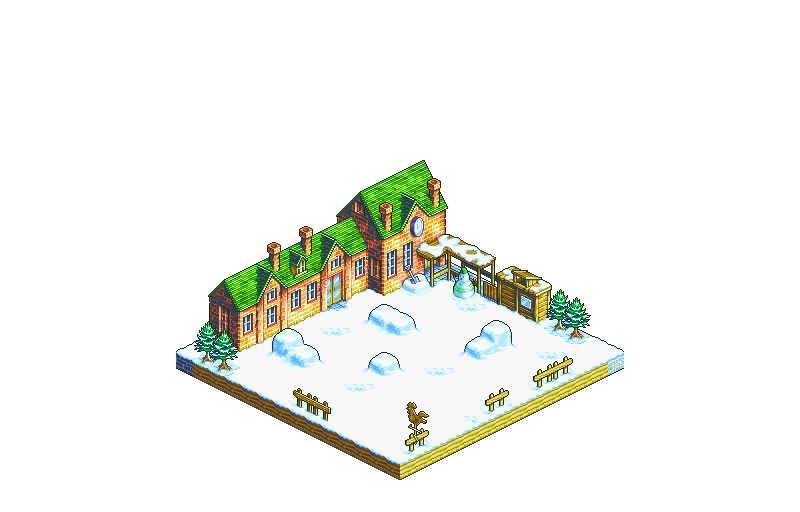
The school main building's front wall, the corridor on its right, the southeast-facing green roof, and the little snow mounds
Rotate the camera behind the building, and you have to give those missing surfaces a color.
To fill in this far side of the Moon, I tried four approaches. All four failed.
2. Four Attempts That Failed
Attempt 1: Tiling Cubes by Height Difference (The Wall of Cubes)
The most intuitive technical approach: since we’ve already extracted each cell’s coordinates $(r, c)$ and height $h$ from the ROM, why not just instantiate a bunch of BoxGeometry in Three.js from those parameters, then project the entire extracted map_000_bg.png onto the front face as a texture?
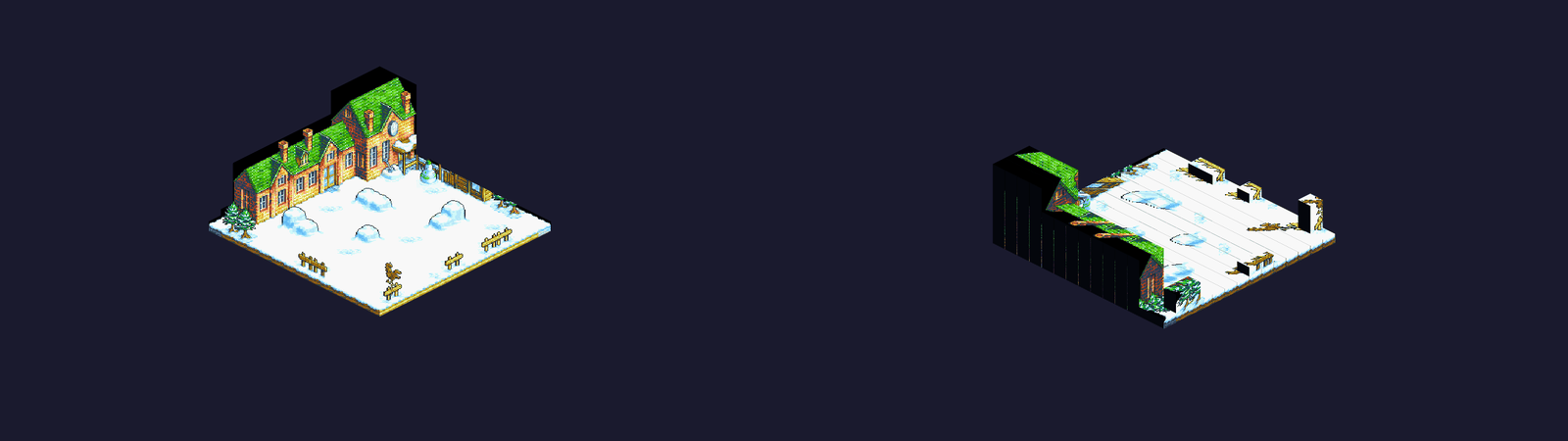
Attempt 1: cube tiling — Dock 0 (left) looks seamless, but rotating to Dock 1 (right) exposes untextured back faces, black sidewall blocks, and a mosaic-staircase roof
- The giveaway: from Dock 0 it does look seamless, but the moment the camera rotates to Dock 1, the whole illusion collapses. The backs of buildings are nothing but black blocks of undefined material, and the originally smooth, continuous sloped roof gets brutally chopped into a blocky mosaic staircase.
- Lesson learned: A height map only records the collision constraints for unit movement. It is not the building’s actual 3D surface geometry at all.
Attempt 2: Billboard-Style Horizontally Mirrored Textures
Since the back is missing, could we do what many low-budget 2D games did back in the day: take the front’s extracted pixel texture, do a horizontal flip, and slap it onto the building’s back and sides?
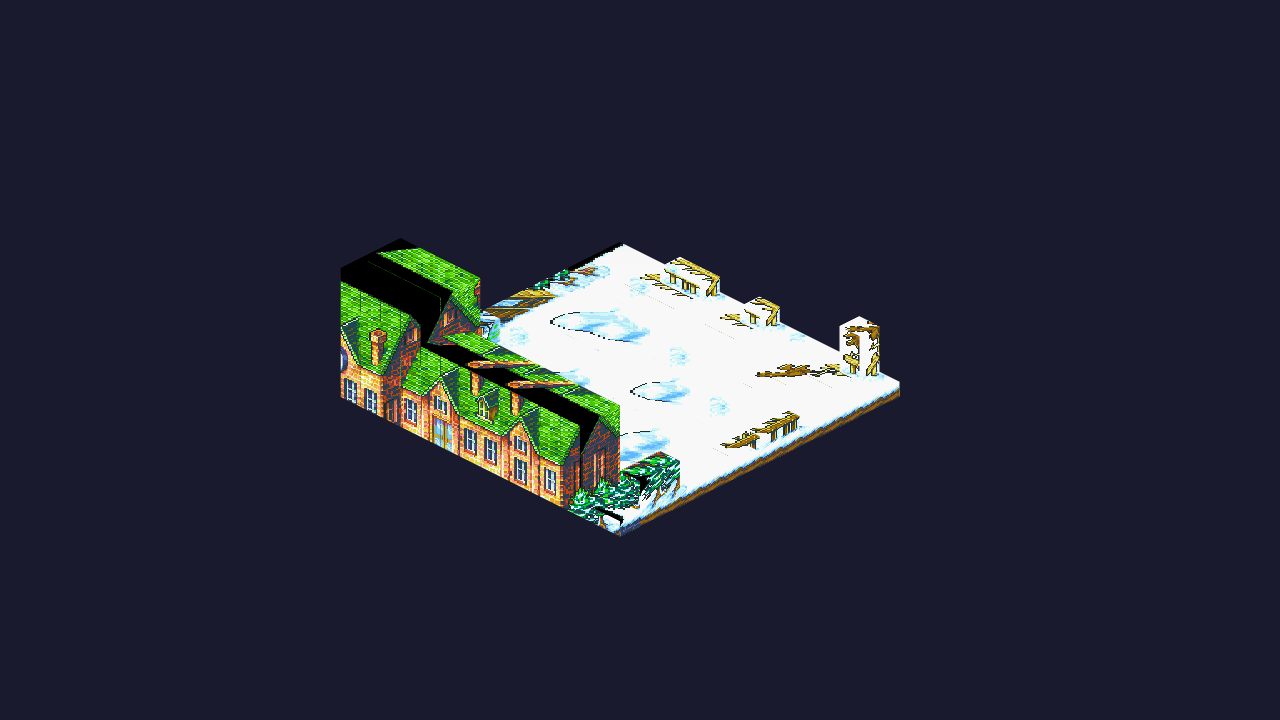
Attempt 2: brute-force mirrored texture — the front's doors, windows, and wall clock appear on the back of the building, and the lit and shadowed sides clash
- The giveaway: this might pass for a symmetric, standalone tree, but for a building it’s catastrophic:
- Spatial structure misalignment: the porch and front entrance, originally on the right side of the building, end up on the left side of the back wall after flipping;
- Lighting logic collapse: the original art’s light comes from the upper-right of the screen. The mirrored texture scrambles the shadows and highlights on the shadow side completely, leaving the whole building with a bizarre “split face” of mismatched lighting.
- Lesson learned: Local details can be symmetric, but a building’s functional layout and environmental lighting are strongly asymmetric.
Attempt 3: Generative 3D (Tripo AI-Generated GLB Model)
Generative 3D tools are worth a try in 2026. I’d seen quite a few one-click 3D model generations and thought they looked pretty good. If I could rebuild the scene directly as a 3D model, it would save a huge amount of manual modeling work. I fed the entire map_000_bg.png into Tripo AI, generated a .glb model of the whole map, and used it as a visual layer replacing the ROM terrain — keeping only the ROM grid for movement and positioning rules. (Just to get the model downloaded from Tripo AI, I even wrote a userscript to bypass their subscription-gated download.)
But zoom in, and the generated model’s coordinates turn out to be completely misaligned with the original map’s discrete grid.
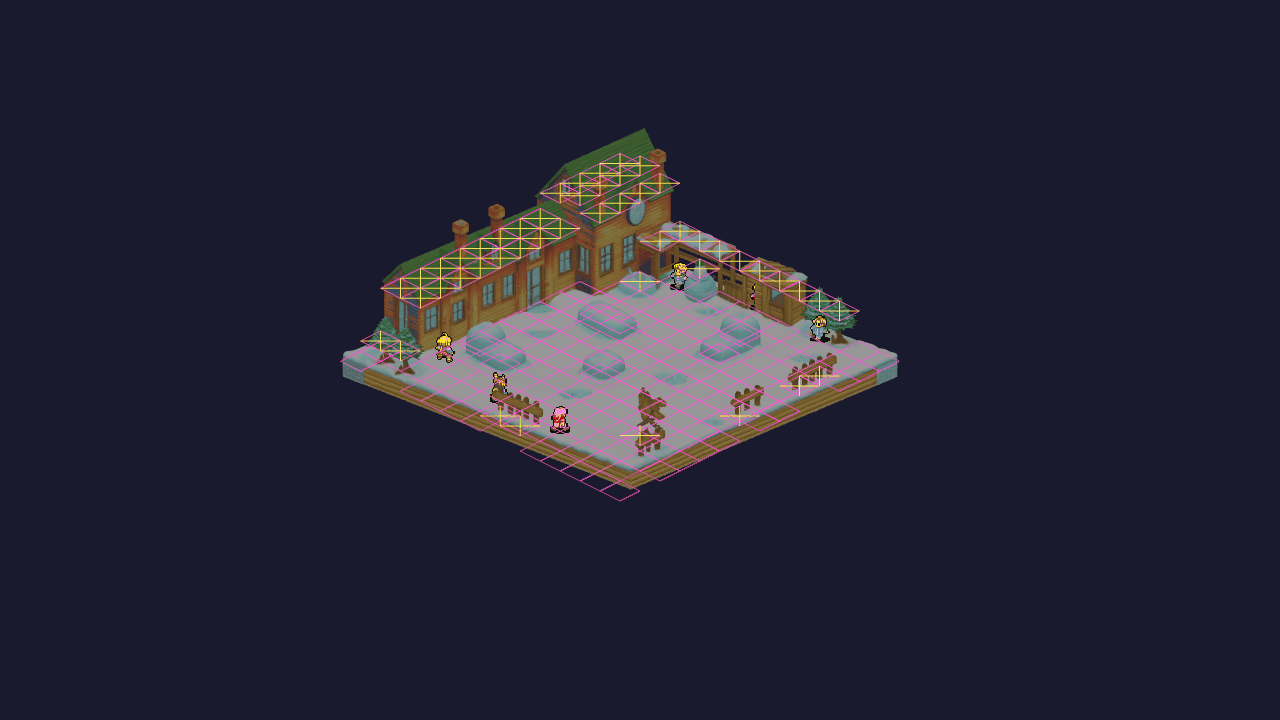
Attempt 3: alignment between the Tripo AI-generated model and the original discrete grid — clearly off
- The giveaway:
- Style drift: AI-generated assets carry modern PBR materials and overly smooth polygon tendencies. Even after forcibly lowering the resolution, they completely lose the retro pixel feel of the 16-color palette and clash with the character sprites hopping around the map;
- Physically inaccurate coordinates: a tactical RPG is a discrete topology. A unit’s footing must rest exactly on strict grid planes. The AI-generated model’s surfaces have subtle curvature and slope, so characters walking on them just clip through.
- Lesson learned: Generative 3D is good at “looking similar,” but a tactical RPG needs “physical-grade, exact-fit alignment.”
Attempt 4: Multi-View Image Generation Guided by Orthographic White-Model Renders
If AI can’t do the 3D directly, what about having AI fill in the other three 2D pixel views for Docks 1, 2, and 3 separately?
To keep the perspective from breaking, I even built a Virtual Camera Capture feature in code: place a flat-colored white model in the scene, render pure geometric structure images in all four directions at a precise $30^\circ$ elevation angle, then hand them to an image generation model together with the original art — instructing it to treat the structure images as an immovable skeleton and only fill in color and pixels.
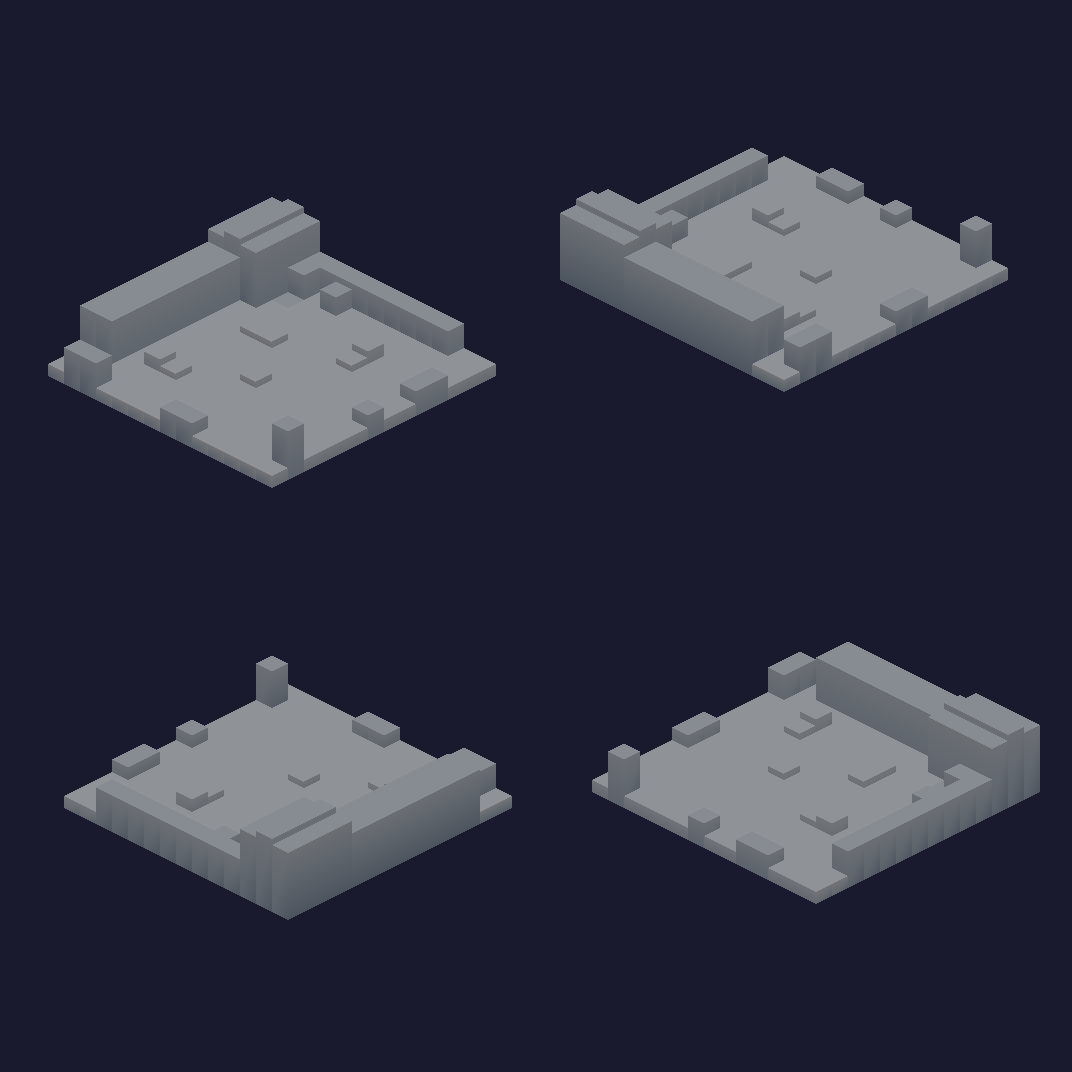
Attempt 4: the four-direction orthographic white-model structure renders (Dock 0–3) given to the image generation model as geometric constraints for repainting the other views
- The giveaway:
- The solid does not match: Dock 0 has two windows and one thick chimney. The generated views add a chimney or drop a window.
- Pixel-level perspective distortion: diffusion models have no internal understanding of “strict orthographic projection with no perspective falloff.” The generated images always carry a subtle perspective tilt at the edges — invisible to the naked eye, but badly misaligned once applied;
- Color drift: the same roof’s tile red comes out with irreconcilable color shifts across different views.
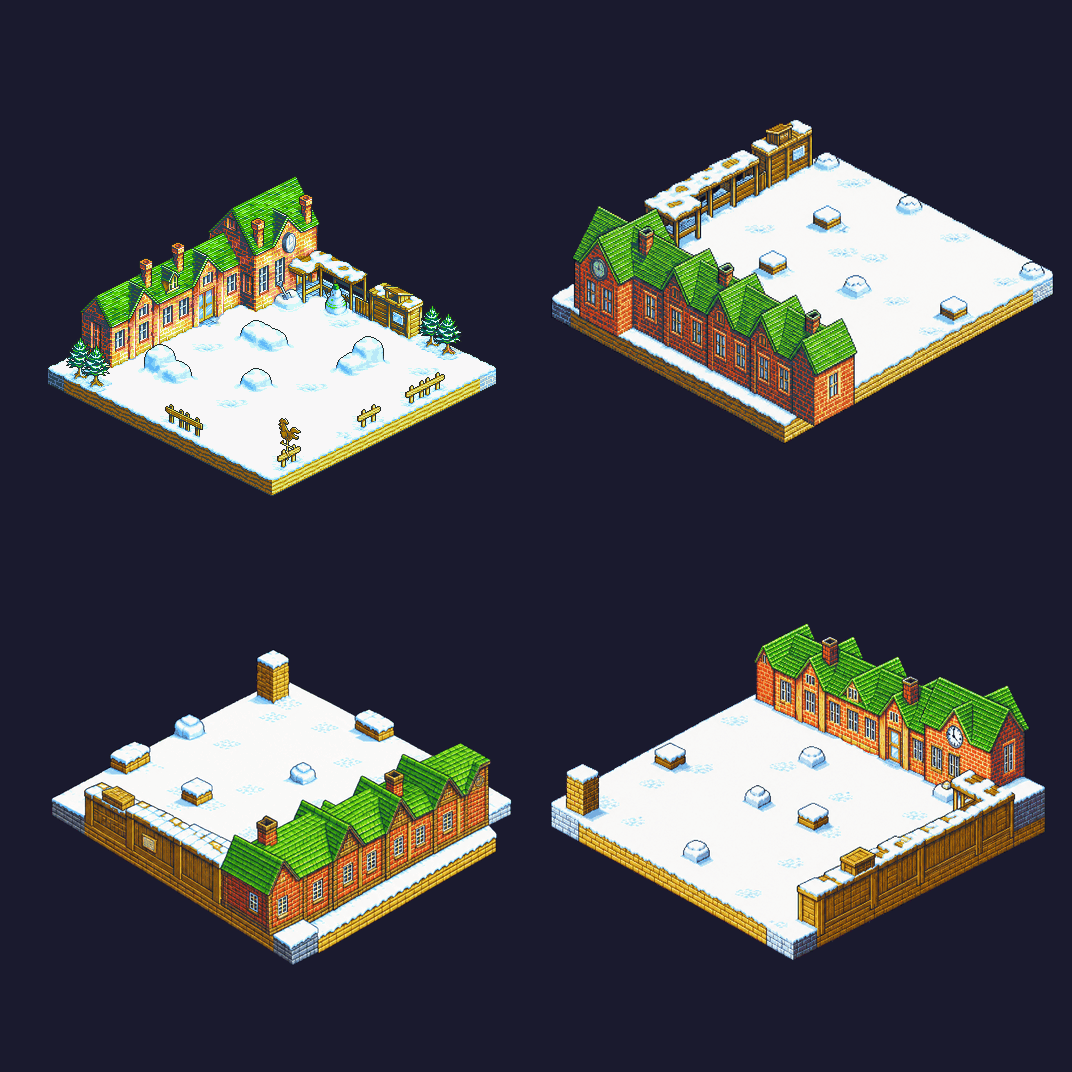
Attempt 4: the image model's repainted output for Dock 0–3 — you can tell each view basically rebuilt the school from scratch
- Lesson learned: AI-generated multi-view images may look visually complete, but without a global constraint on the 3D structure, they can’t guarantee geometric or pixel-level consistency. I could not use any of the four views.
Interim Summary
| Approach | What we tried | Core failure / why it didn’t work | Lesson learned |
|---|---|---|---|
| 1. Simple tiling | Stack cubes by height difference, project the texture on the front | Black untextured blocks and truncated geometry at every non-Dock-0 view | A 2.5D pixel painting is a skin with nothing behind it |
| 2. Billboard mirroring | Horizontally flip the front texture onto the back | Misplaced doors and windows, lit and shadow sides clash | Spatial structure and lighting are asymmetric; mirroring breaks spatial logic |
| 3. Text-to-3D (Tripo) | Generate a GLB model directly with a single-image 3D tool | Modern smooth mesh loses the pixel texture; can’t lock onto the integer elevation grid | Generative 3D aims for visual similarity, but tactics games need physical-grade alignment |
| 4. Image-gen for other views | Export four-direction white-model structure renders for AI to repaint | Slight perspective drift per view, inconsistent key elements (chimneys/windows), color drift | A few isolated 2D hallucinations can’t assemble a spatially coherent 3D solid |
3. The Breakthrough: Back to Parametric Geometry and UV Projection Baking
After those four attempts, I opened Codex and talked it through with GPT-6 Astra.
I’ve already tried four approaches and all failed: cube tiling, horizontal mirroring, AI-generated 3D models, and AI-repainted multi-view images.
Is there a solution that doesn’t rely on AI guessing or crude mirroring?
Think of it this way: you have a photo of a school, and you want to turn it into a paper model you can view from all four sides.
The photo captured the front and the right side, but not the back or the left. Rotate the photo all you want — you still won’t see the windows on the school’s back, because that information was never in the photo.
Having AI guess, or mirroring, means several images that never agreed on a single solid structure. The right approach is: build the skeleton with a ruler first, freeze the front pixels and bake them on, then fill in the back with colors that stay structurally coherent.
I did not yet see why the skeleton had to come first. I tried it anyway: parametric geometry, then UV projection baking.
The Data Foundation: ROM Reverse Engineering and Isometric Space Conversion
To rebuild the scene, you first need the real physical dimensions. The isometric scenes in old games weren’t drawn out of thin air — they’re backed by rigorous in-memory structures.
1. Extracting the Map Height and Traversal Grid
By analyzing the FFTA ROM, we located the global map pointer table. Each map occupies a 0x58-byte configuration structure, where offset 0x10 points to the height-map container data.
That data is wrapped in a Mode 0x11 container, decompressed via the GBA BIOS’s LZ77 algorithm, and then unpacked into a packed-record stream 16 cells wide. Each cell carries two decisive fields:
- $h$: terrain height (in step-height units);
- $p$: passability ($p=0$ means walkable, covering flat ground and standable snowdrift high ground; $p=1$ means blocked — school building, fences, trees, snowmen).
2. The Strict Mathematical Mapping Between 2:1 Isometric and a 3D Orthographic Camera
The GBA’s screen resolution is only $240 \times 160$. To convey depth on such limited hardware, its diamond tiles have a strict $1:2$ height-to-width ratio (a single flat tile is 32 pixels wide and 16 pixels tall).
Dragging an OrbitControls camera around leaves the pixels warped. The isometric mapping here has one solution:
- Elevation: Under orthographic projection, the vertical compression ratio of the diamond tiles corresponds to the camera elevation angle $\theta$. Since the tile’s height-to-width ratio is $1:2$: $$\sin\theta = 0.5 \implies \theta = 30^\circ$$ The camera’s pitch must be locked precisely at $30^\circ$.
- Pixel density ratio (PPU, Pixels Per Unit): Projecting a cube with edge length 1 in world space at a $30^\circ$ elevation and $45^\circ$ yaw gives a diamond with diagonal projected width $\sqrt{2}$. To render the 32-pixel tile at native, unstretched 1:1 pixels on screen: $$\text{PPU} = \frac{32}{\sqrt{2}} = \sqrt{512} \approx 22.63$$
- Vertical step conversion:
Measured precisely against the original background art, each +1 in height raises pixels vertically on screen by 6 pixels (
BG_H_SCALE = 6).
With this airtight mathematical mapping, we aim the orthographic camera at Dock 0 (default azimuth $-135^\circ$), and the original art and the 3D coordinate system coincide at sub-pixel precision.
1. “Surveying” the Geometry in Code and the Back-Projection Equations
Instead of auto-generating faces from the collision grid, we wrote a dedicated parametric build script, tools/build_school.py.
Using the original art as the baseline blueprint, we surveyed the school building’s true length, width, eave height, and ridge height through the projection formulas, and generated clean vertex arrays in code. Whether it’s the main building’s roof, the porch columns, the shed’s sloped face, or the two chimneys — everything is a parametric, deterministic polygon.
The Back-Projection Math Model
Given a 3D world point $\mathbf{P} = (c, y, r)$ — where $c$ is the map column (along the X axis), $r$ is the map row (along the Z axis), and $y$ is the 3D elevation (Y axis pointing up) — its projection onto pixel screen coordinates $(u, v)$ on the 2D original background image (512×512) satisfies the following closed-form expressions:
$$\begin{cases} u = 256 + (c - r) \cdot 16 \\ v = 244 + (c + r) \cdot 8 - (y - y_{\text{base}}) \cdot V_P \end{cases}$$The vertical projection scale factor $V_P$ (Vertical Pitch) is strictly derived from the pixel density $\text{PPU}$ and the camera elevation ($30^\circ$):
$$V_P = \text{PPU} \cdot \cos\left(\frac{\pi}{6}\right) = \sqrt{512} \cdot \frac{\sqrt{3}}{2} \approx 19.596$$The 6-pixel height step measured in the original art corresponds exactly to a world-space height unit of $\Delta y = \frac{6}{V_P} \approx 0.306$. In the script, this conversion is fixed as a deterministic function:
1# Project 3D world coordinate (c, y, r) into 2D native screen pixel (u, v)
2def project(p):
3    c, y, r = p
4    return np.array([256 + (c - r) * 16, 244 + (c + r) * 8 - (y - BASE) * VP])
Normal Adjudication and Winding Order Correction
In WebGL, with back-face culling enabled, the vertex winding order (clockwise CW vs. counterclockwise CCW) determines which way a polygon’s front normal points. When generating 3D point sets parametrically by hand, it’s very easy to get the coordinate traversal order backwards, making the front face point inward — so walls vanish into thin air when the camera rotates.
We added automatic correction based on the vector cross product inside the polygon registration function add(). Given the first three points of a vertex sequence $\mathbf{p}_0, \mathbf{p}_1, \mathbf{p}_2$ and the expected outward-facing reference normal $\mathbf{n}_{\text{out}}$, the plane’s geometric normal is computed from the cross product:
A dot-product sign check determines whether the normal points the same way:
$$\mathbf{n}_{\text{calc}} \cdot \mathbf{n}_{\text{out}} < 0 \implies \text{vertex order is reversed; flip the whole sequence}$$ 1def add(name, points, kind, outward, donor=None):
2 points = np.array(points, dtype=float)
3 uv_pixels = (np.array([project(p) for p in points])
4 if donor is None else np.array(donor["sourcePixels"]))
5 # Ensure outward normal: flip vertex & UV winding order if misaligned
6 if np.dot(np.cross(points[1] - points[0], points[2] - points[0]), outward) < 0:
7 points = points[::-1]
8 uv_pixels = uv_pixels[::-1]
9 f = dict(name=name, vertices=points.tolist(), sourcePixels=uv_pixels.tolist(),
10 kind=kind, provenance="reused" if donor else "source",
11 donor=donor["name"] if donor else None)
12 FACES.append(f)
13 return fThe cross-product flip fixed two things: units sit on integer grid edges, and walls stay visible after a rotation.
2. Front-Face Back-Projection and Back-Face UV Baking
With those faces in place, I textured them by projection:
- Visible front faces (Source Faces):
Using the mathematical back-projection
project(), we project each vertex’s 3D coordinate directly onto pixel coordinates in the original backgroundmap_000_bg.png, precisely crop out the texture, and bake it into a unified atlasschool_atlas.png.- Occlusion deduplication: chimneys and skylights sit flush against the roof and walls. To keep the wall bake from also baking the chimney’s front pixels onto the main wall (which would leave a chimney “ghost” on the wall once the camera rotates), the script rasterizes out the source regions covered by chimneys before baking the walls.
- Hidden back faces (Reused Faces): The back is no longer a simple mirror flip. Instead, following the geometric face correspondence, it reuses the already-cleaned texture regions from the front, recomputing normals and UV layout.
- Hidden sides and the ground platform (Patches):
For the shaded dirt slopes and hidden snow walls ($-x$ and $-z$ directions) that never appear in the original art, we carved out several seamlessly tileable patches in
ground.png, which the build script tiles programmatically along the height-step stride (12 pixels per height unit): $$v_{\text{patch}} = 1 - \frac{y_{\text{rect}} + \min\left((h_{\text{top}} - h) \cdot \Delta h_{\text{step}}, h_{\text{rect}}\right)}{\text{TEX\_SIZE}}$$
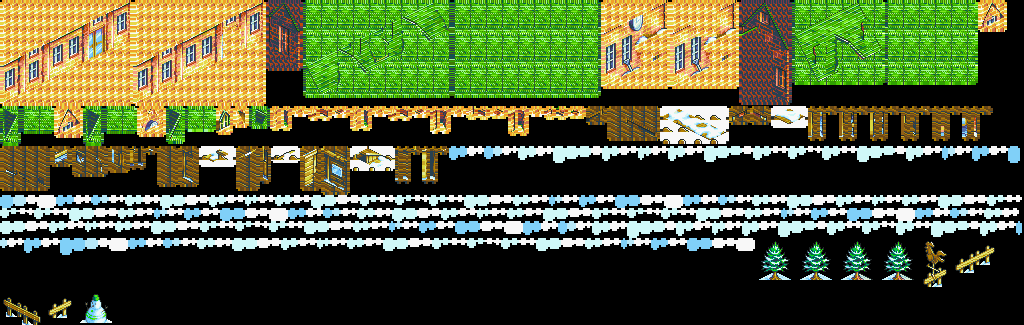
The complete material atlas school_atlas.png generated by the build script: baked front and back textures plus prop faces
3. The Agile Loop of the school-corner Mini-Scene
To validate this pipeline, we didn’t rush to cover the whole map. Instead, we first built a “school corner mini-scene” on a standalone page containing just 6 ground tiles.
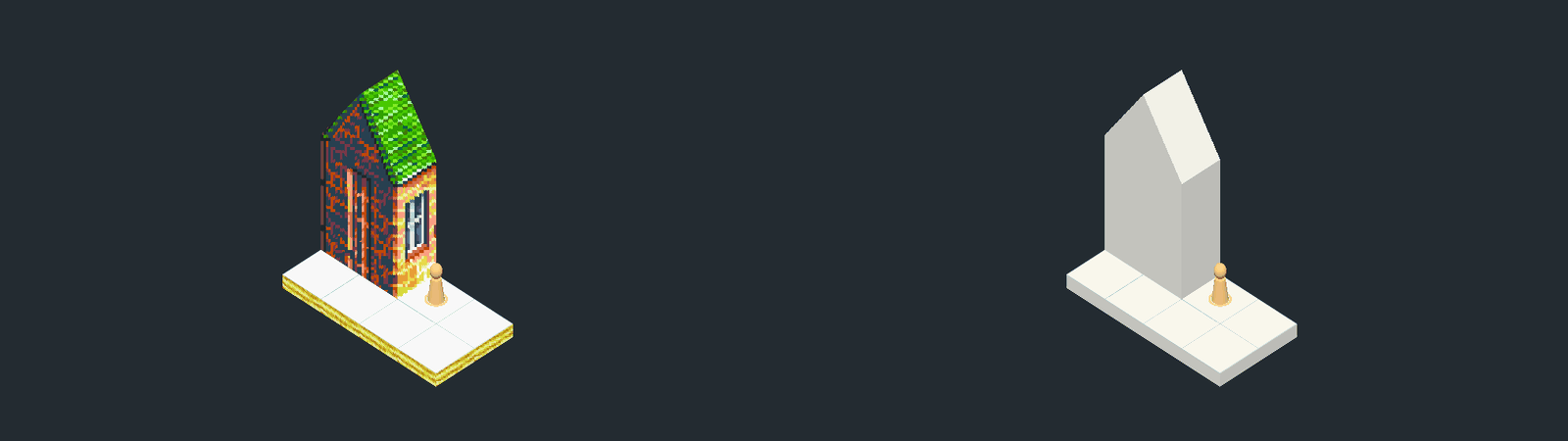
Attempt 5: the school-corner mini-scene — pressing B toggles between the white-model skeleton (right) and the front/back UV-baked textures (left) to verify four-way alignment
In this lightweight test bed, we locked in three critically important verification mechanisms:
- Press
Q/Eto verify the absolute anchoring of tiles and windows through the 4-way rotation; - Press
Bto toggle between “white model / textured material” and visually check whether geometry and pixel outlines drift by even half a pixel; - Move the test character and confirm the unit’s feet stay flush with the ground plane on slopes and steps.
Only after verification passed completely did the script scale up in one shot to the entire schoolhouse and backyard playground, generating .obj and .zip backup assets ready to import into Blender.
5. Killing the Dissonance: Eliminating Billboards and Multi-View Self-Consistency
The building’s far side was done. Props, characters, and terrain still broke the illusion as soon as the camera moved.
1. Scene Props Cannot Stay Camera Billboards
In isometric games, trees, snowmen, and weathervanes are usually made into single flat billboards that always face the camera.
But in a 3D four-way switching system, that lazy trick causes severe depth-clipping bugs:
- The snowman clipping disaster: the snowman’s anchor was set at the center of the tile beneath it, but in the original art it actually stands toward the front. When the camera rotates to the side, the wooden veranda railing’s depth lands right in front of the tile center — so the railing “skewers” straight through the snowman’s body.
- The twin-tree split: the two trees on the right side of the scene are a single merged sprite in the original art; they can’t occlude each other independently when the view rotates.
The final fix: drop billboards entirely and switch to spatially fixed polygons (see FIXED_PROPS in build_school.py):
- The fence became fixed panels extending along grid edges (
r/c); - Trees, the snowman, and the weathervane were all split into $45^\circ$ crossed quads (
x/xx), each trunk planted precisely inside its own tile cell. Rotate the camera and the sense of depth is rock solid — no more front/back clipping.
2. Camera-Relative Facing Resolution for Moving Units
With props fixed as solid quads, the 2D pixel sprites running around the scene brought a new challenge.
In the original 2D game, a character only has four fixed logical facings: $\text{Facing} \in \{0: \text{North}, 1: \text{East}, 2: \text{South}, 3: \text{West}\}$.
But in a 3D multi-view system, the same character running “east” looks like it’s running front-right from Dock 0 (the default front view); when the player presses E to switch to Dock 1, it should appear on screen running back-right; at Dock 2, back-left.
To keep the character’s world facing unchanged while only swapping the rendered visual frames, the system derives a camera-relative facing resolution formula:
$$\text{rel} = (\text{facing} - \text{camDock} + 4) \pmod 4$$A lookup in FACING_TABLE[rel] instantly decides whether to sample the front or back sprite strip, and sets the sign of the texture’s repeat.x to apply a horizontal flip:
1// Relative facing lookup: maps (facing - camDock) to sprite slot + UV flip
2export const FACING_TABLE = [
3  { pose: "back",  flip: true  },  // 0: facing away, to the right (NE)
4  { pose: "front", flip: true  },  // 1: facing forward, to the right (SE)
5  { pose: "front", flip: false },  // 2: facing forward, to the left (SW)
6  { pose: "back",  flip: false },  // 3: facing away, to the left (NW)
7];
No matter how the camera rotates, the character’s running clock and animation progress (frame index) stay continuous. The facing flip transitions smoothly at the instant the camera passes the halfway point of its rotation — no animation reset, no skipped frames.
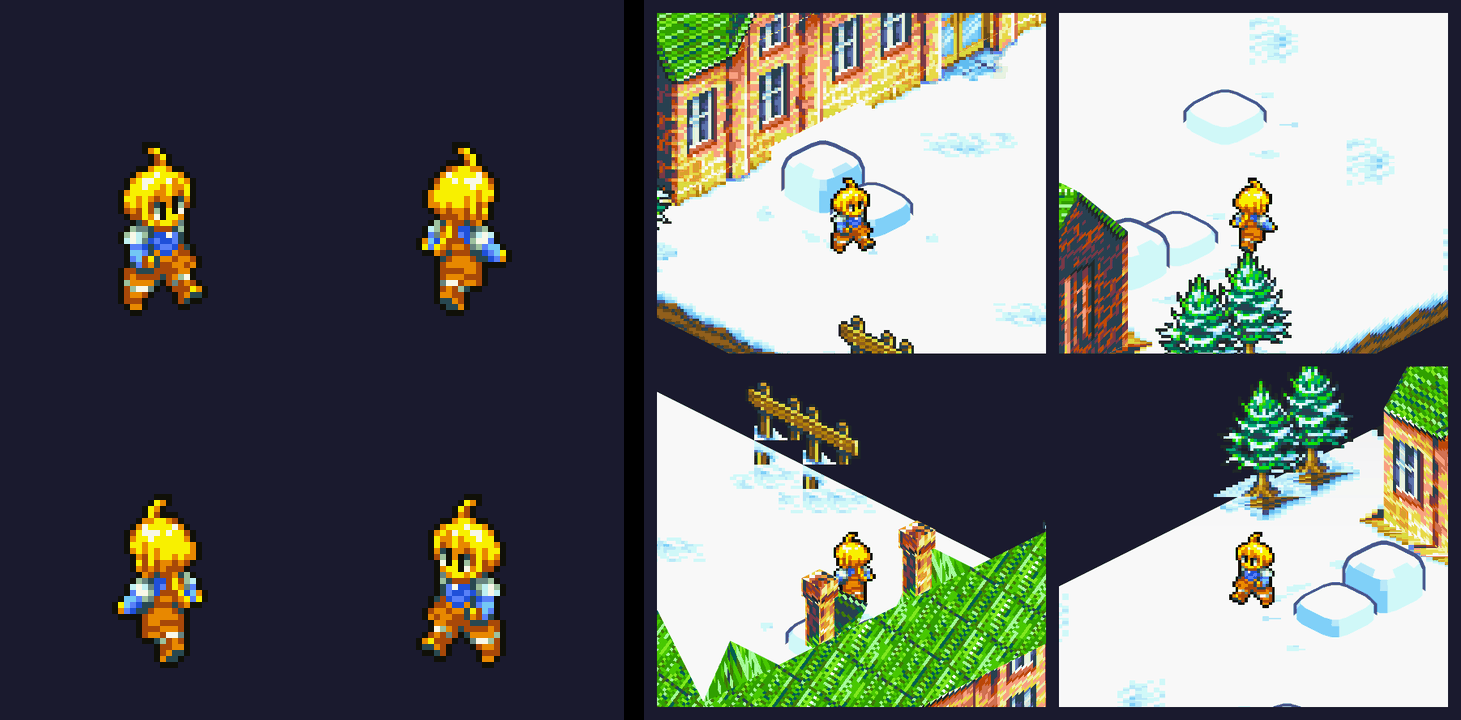
Marche's camera-relative facing across the 4 docks: world facing stays fixed while the rendered frame switches front/back and horizontal flip with the camera
3. Hand-Drawn Pixel Outlines on the Snowdrifts: The Inverted Hull Trick
The snowdrifts in the original GBA scene aren’t flat — the artists outlined them with a rounded dark-blue contour (#485888) into cute bun-shaped mounds.
If you bake that outline into the texture in 3D, rotating the camera to the side reveals an ugly black edge strip.
We ended up using the classic cel-shading Inverted Hull technique: for each snowdrift, generate a dome shell scaled up 1.08× around its center, set the material to render back faces only, and give it a fixed dark-blue pixel color. The dark-blue shell draws the outline from every dock.
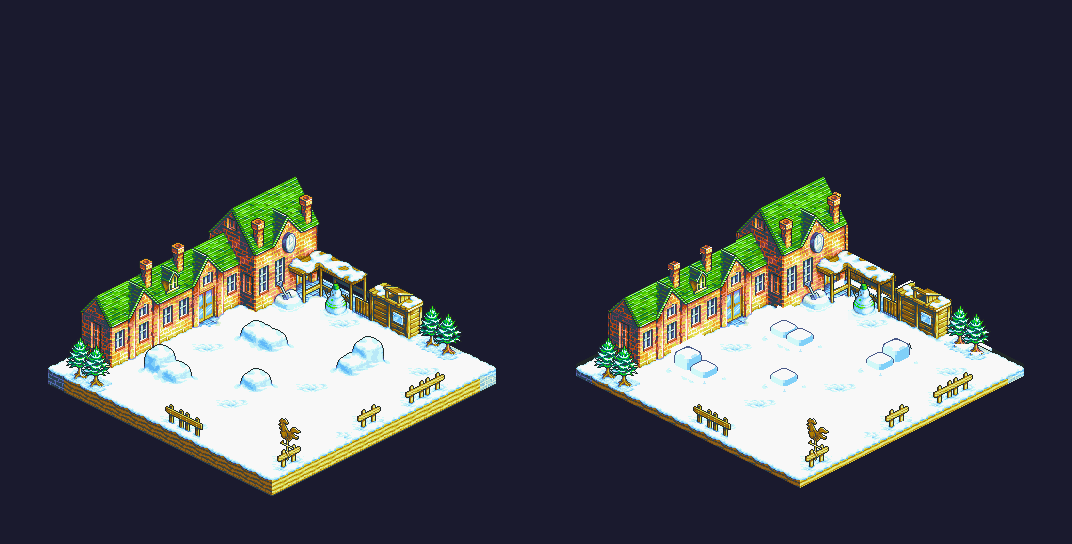
Original GBA snowdrift pixel outline (left) vs. the Inverted Hull 3D implementation
6. Closing Thoughts and Engineering Takeaways
Finishing the snowball fight, and only that first stage, felt like sitting through a hundred computer graphics lectures I had skipped.
Generative AI can emit a 3D mesh or a set of views in one pass. On this board it missed three constraints I could measure: discrete tactical elevation, orthographic projection with no perspective, and the same chimney and windows in every view.
The FFTA team rendered this pixel art with algorithms and texture mapping. This demo is my tribute to that work.
 Hi, I’m CheerChen.